

The problem
Small teams ship websites without a QA person. A store owner on WooCommerce, a three-person SaaS team or a small agency changes a theme, updates a plugin and presses publish. Nobody checks whether signup still works, whether a coupon still applies, or whether the cart's Remove button still removes anything. Customers find out first.
That button is no invented example. It comes from the competition brief itself: "unable to use the delete button to remove an item from the shopping cart." The brief asked for an agent that turns a goal into test steps, runs them in a browser, logs failures and reports evidence with steps to reproduce.
Existing test-automation tools mostly assume someone writes and maintains test code. My target user has no test suite, often no access to the code, and one question: "Is my site safe to release? If not, what's broken?"
The hackathon added hard rules that shaped the design:
- The agent has to be the core of the product, not a feature on the side.
- Only hosted LLMs, no local models. No agent builders or automation tools such as n8n.
- Judges must be able to sign up, log in and finish the whole flow on the deployed site with no help. A CLI doesn't count.
What I built
The whole product is one guided flow. Every step happens in the web app.
- Add a siteA URL and a checkbox: "I own this site or am authorized to test it."
- Pick a test and a modeRegistration, Store & checkout, or Both. Hard lets the strongest model drive the browser; Easy costs about half.
- Approve the planThe agent explores the site, proposes scenarios and waits. Nothing is tested before you approve.
- Watch it testA live view of the agent's real browser, every action with its reason, elapsed time and AI cost so far.
- Read the reportOne verdict per scenario: Passed, Bug found, Blocked or Inconclusive, with screenshots, console and network errors and repro steps.
- Watch it happenEach scenario is recorded on video. "Watch video" on a bug plays exactly that moment.
- Check your fixRe-run same plan runs the same scenarios again and marks each one fixed, still broken or new.
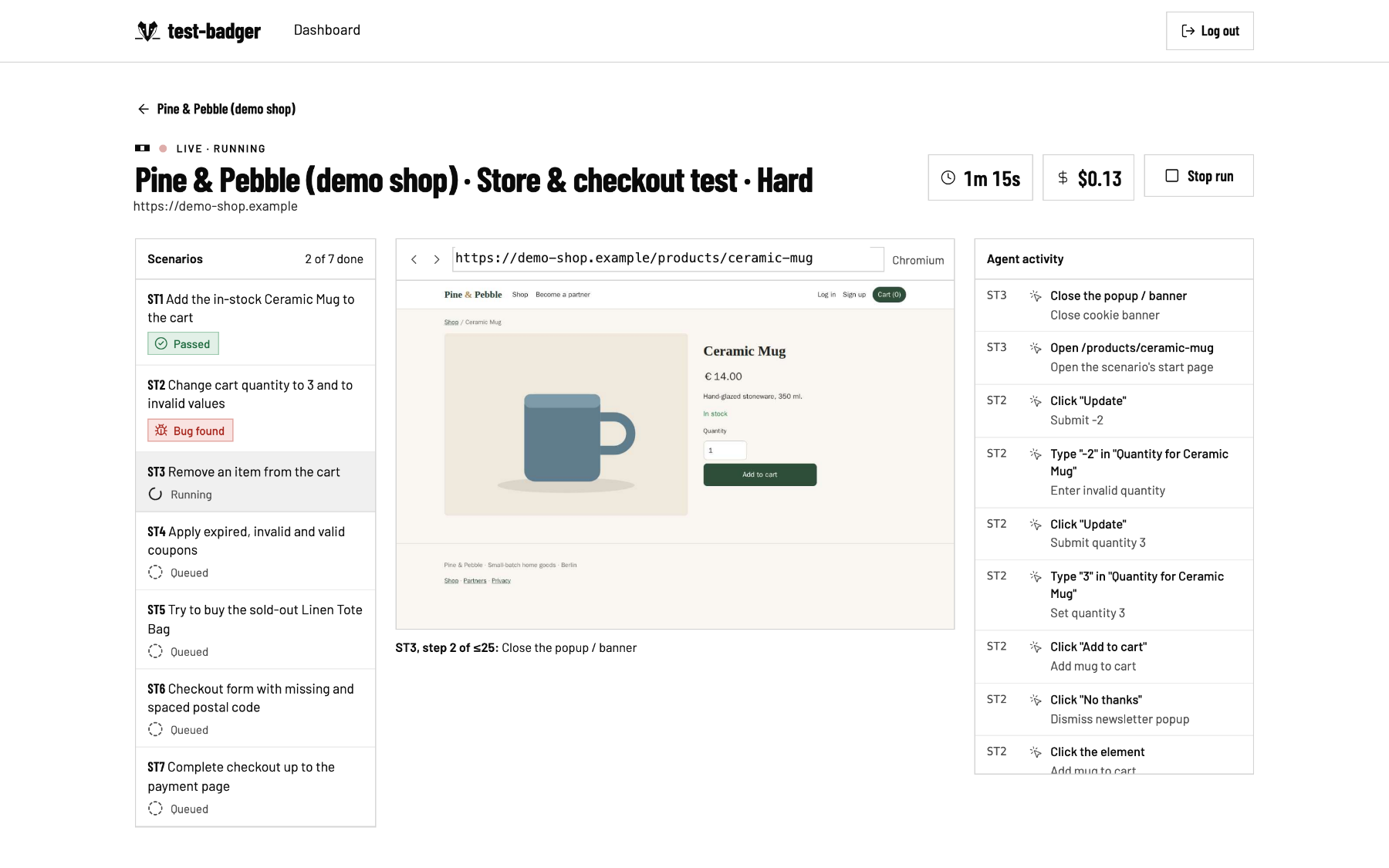
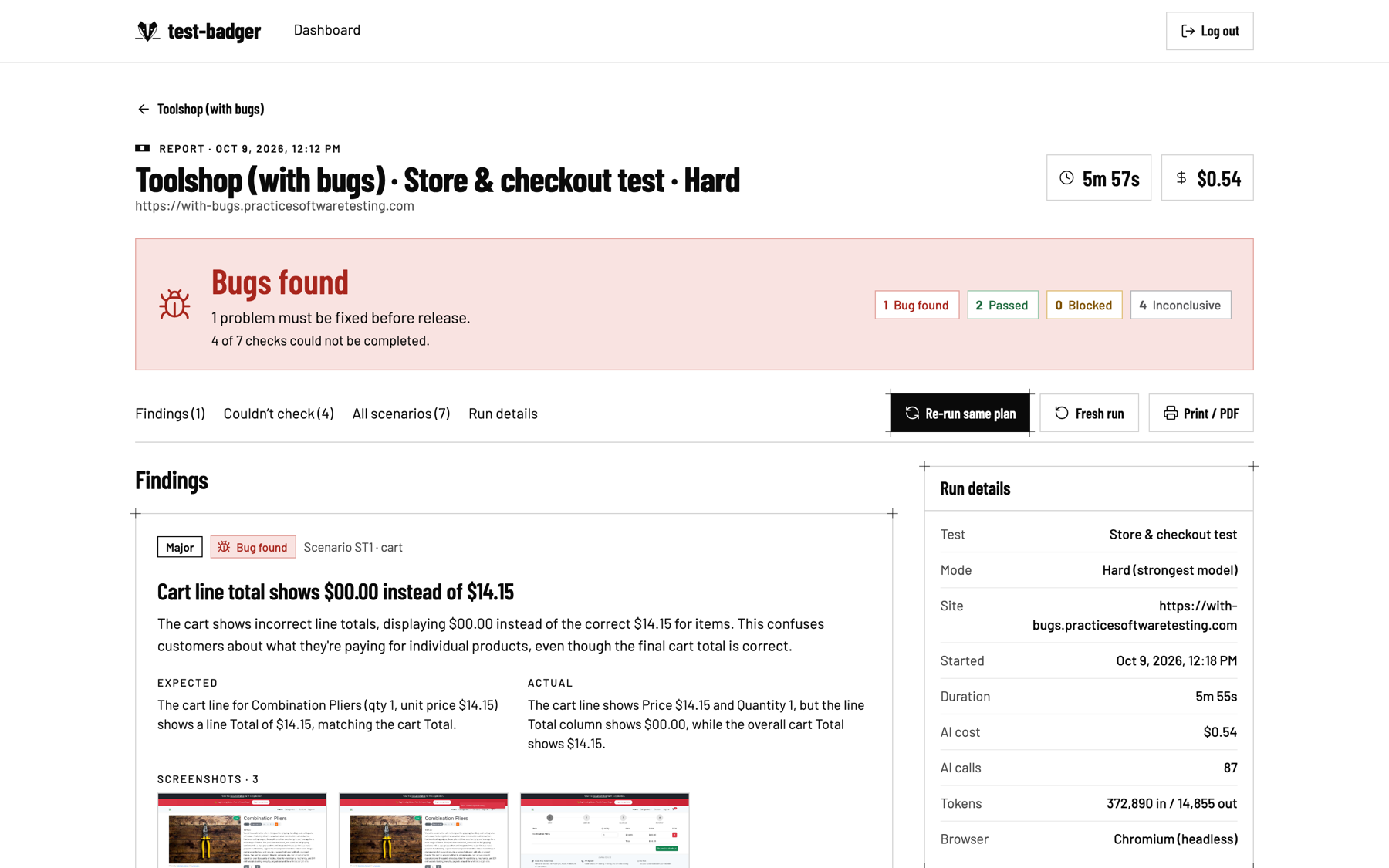 Bug found. Expected vs. actual, evidence, steps to reproduce.
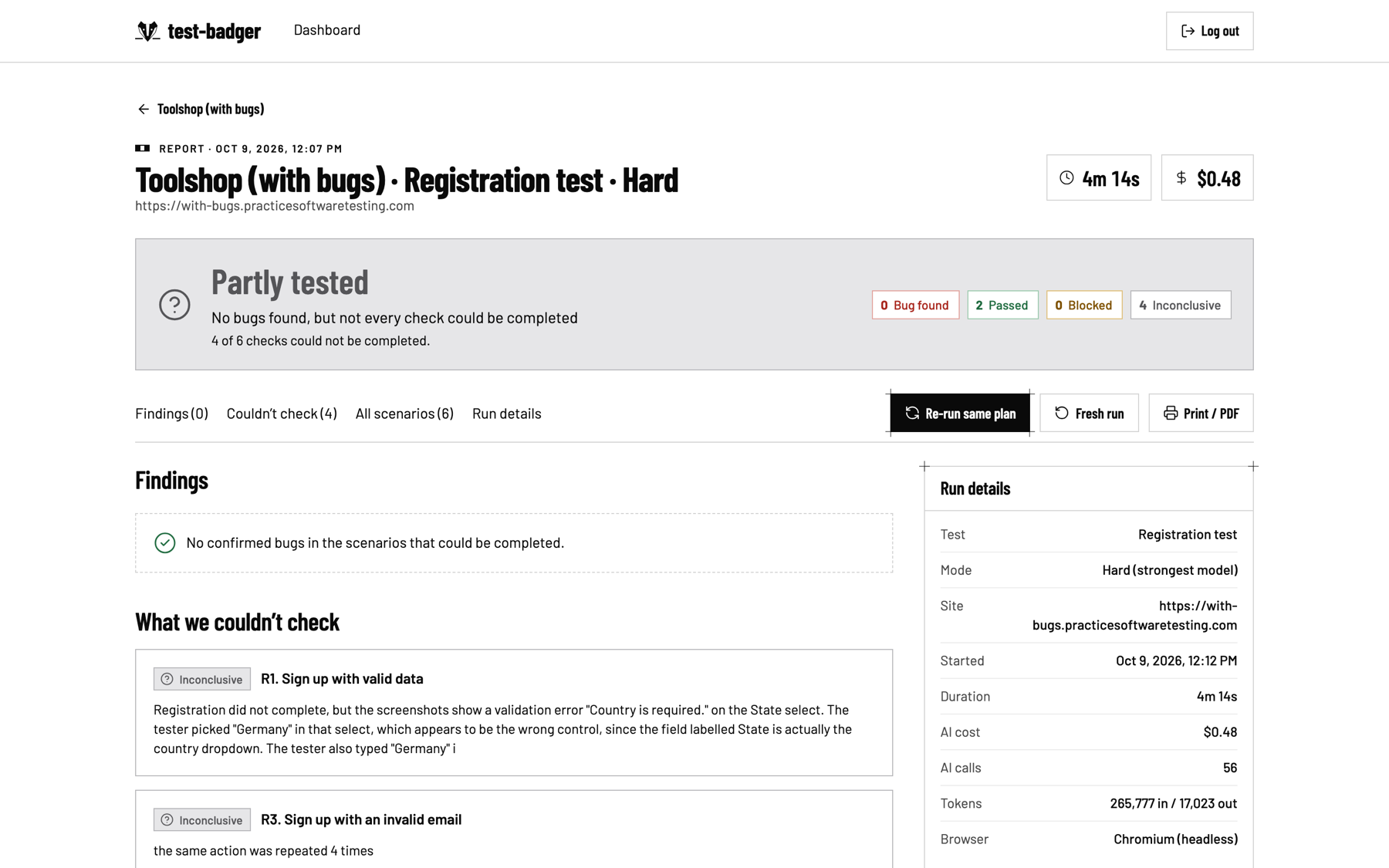 Partly tested. When the agent can't finish a check, it says so and why.
How the agent works
Architecture
The API never opens a browser. It queues jobs, and a separate worker runs the agent and Chromium. Every step is published through Redis and streamed to the page as server-sent events, so the live view updates as the agent moves.
The pipeline
- Recon opens the site and finds the signup, cart and checkout pages on its own.
- Planner turns a test-type template plus what recon found into concrete scenarios, then stops for human approval.
- Executor runs each scenario in a loop of observe, decide, act. It reads a compact page snapshot with numbered element references, adds a screenshot only when the text isn't enough, and picks one browser tool per step.
- Triage sends every suspected bug to a second model call that verifies it against the evidence. Duplicates are dropped, and unsure cases become Inconclusive.
- Reporter writes a plain-language summary. Repro steps, URLs and errors are filled in by code from the recorded steps, never by the model.
One step, in detail
Rules I held the code to
- The LLM decides, the code enforcesThe origin allowlist, the private-network (SSRF) block, the payment guard and the step and cost budgets are Python, not prompt text. The agent can ask to pay; the tool layer refuses.
- Every model output is a typed modelEach LLM response is validated as a Pydantic model, with one retry carrying the error, then a clean failure.
- Secrets never reach the modelThe model only sees
{{TEST_EMAIL}}and{{TEST_PASSWORD}}placeholders. The tool layer swaps in the real values, and password fields are masked in screenshots. - Evidence comes from recordingsScreenshots, video, console and network errors come from Playwright, not from what the model says it saw.
- Honest verdictsInconclusive beats a weak Bug found, and the report is green only when every scenario passed.
- Generic core, pluggable flowsRegistration and Store are template files. A login or booking test would be one more file, with no core changes.
A few other choices that paid off:
- A plain async Python orchestrator instead of an agent framework. The stages are fixed and the loop is short, so plain code was easier to debug than a graph library.
- One LLM client for every provider (Anthropic, OpenAI, any OpenAI-compatible endpoint), with the model chosen per role in config. Swapping the executor model became a one-line experiment, and that experiment turned into the Hard/Easy feature.
- A fake "sim" provider for development: a rule-based stand-in that drives real browser runs with no model calls. The UI and the demo video were rehearsed without spending a cent.
- Re-runs compare per scenario ID, not per finding title. Titles are written by the model and change between runs; the scenario IDs of an identical plan don't.
Proving it works
An agent that says "looks fine" is worthless if you can't check it. So I built the answer key first.
A demo shop with planted bugs
Pine & Pebble is a small store I built as the test target, with nine bugs planted on purpose behind switches: an invalid e-mail accepted, unchecked password confirmation, a fake "Welcome!" on duplicate signup, a crash on an empty name, the dead Remove button, negative quantities, an expired coupon that still works, an out-of-stock item you can buy, and a postal code with a space that silently blocks checkout. It also has five things a good tester must not report: a cookie banner, a newsletter popup, a loading spinner, an animated badge and a CAPTCHA page, which must end as Blocked.
Demo shop "Pine & Pebble": 9 planted bugs
Our test target. Every bug can be switched on or off; Registration finds B1–B4, Store & checkout finds B5–B9.
- B1Invalid email "anna@" is accepted
- B2Password confirmation is not checked
- B3Duplicate email shows a fake "Welcome!"
- B4Empty name crashes the server (500)
- B5"Remove" does nothing (JavaScript error)
- B6Quantity −2 gives a negative total
- B7Expired coupon SUMMER24 still applies 20 % off
- B8Out-of-stock Linen Tote Bag can still be bought
- B9Postal code "10 115" silently keeps Continue disabled
9 planted bugs, three rounds
Each square is one planted bug. Filled = the agent reported it with evidence.
| Round | B1 | B2 | B3 | B4 | B5 | B6 | B7 | B8 | B9 | Executor model | Runs | Missed (reported Inconclusive) | False findings |
|---|---|---|---|---|---|---|---|---|---|---|---|---|---|
| Round 1 · Sonnet drives | 1 | 1 | 0 | 1 | 1 | 1 | 1 | 1 | 0 | Claude Sonnet 5.5 | 3 pairs of runs + 2 clean runs | B3, B9 | 0 |
| Round 2 · after the fixes | 1 | 1 | 1 | 1 | 1 | 1 | 1 | 1 | 1 | Claude Sonnet 5.5 | after fixes | none | 0 |
| Round 3 · Gemini Flash drives | 1 | 1 | 1 | 1 | 1 | 1 | 1 | 0 | 1 | Gemini 3.8 Flash | B8 | 0 |
The two misses in round 1 taught me the most. Neither was fixed with prompt text:
- B3 (fake success on duplicate signup). The verifier hedged because it never saw that the first account had been created in an earlier scenario of the same run. Fix: triage now hands the verifier the results of the scenarios a scenario depends on, as established facts.
- B9 (postal code with a space). The agent had first submitted the empty form, and the shop's "Enter a valid postal code" message stayed on screen. After it typed
10 115, that stale message looked like a correct rejection. Fix: the shop says "is required" for empty fields, as it does everywhere else. The bug itself didn't change.
Both fixes changed what the agent could see, not what it was told. After them: 9 / 9.
Cost, measured and cut
Every model call is logged with tokens and dollars, so cost per run is a number on the screen, not a guess.
What one test run costs
US dollars of AI per full run on the demo shop. Same agent, three configurations.
| Configuration | Registration (6 scenarios) | Store & checkout (7 scenarios) |
|---|---|---|
| Sonnet, no caching | $0.44 | ~$0.65 (estimate) |
| Hard: Sonnet + prompt caching | $0.29 | $0.43 |
| Easy: Gemini Flash as executor | $0.15 | $0.26 |
The first full run cost $0.44, and 76 % of that was the executor. About 85 % of every executor call was an identical prefix of tool schemas and system prompt, paid again on every step. Prompt caching made that prefix cost a tenth of the price:
One executor step, before and after caching
Input tokens of a single call. The prefix (tool schemas + system prompt) never changes between steps.
| Call | Full price ($2.00 / M) | Cache read ($0.20 / M) |
|---|---|---|
| Before · $0.0084 | 2,625 | 0 |
| After · $0.0016 | 168 | 2,460 |
Trying a cheaper executor model was a one-line config change. Gemini Flash found 8 of 9 at roughly half the price, so instead of picking one, I shipped both as the Hard and Easy modes.
Then a store I didn't build
Nine of nine on your own shop proves less than it seems. So I pointed the unchanged agent at Toolshop, a public training store by testsmith with 94 planted bugs and an official bug list. I wrote the in-scope answer key (19 functional bugs) before running anything, and used Toolshop's clean twin as a control.
Our shop, then someone else's
The same agent, untuned, on a site with an answer key written by somebody else.
| Our demo shop | Toolshop | |
|---|---|---|
| Planted bugs foundin-scope bugs only | 9/9 | 1/19 |
| False findings13 runs vs 6 runs | 0 | 0 |
| AI cost per Hard runToolshop is a heavy Angular app | $0.29–0.43 | $0.48–0.69 |
| Real bug on the "clean" copyreproduced by hand | – | 1 |
A store we did not build
Toolshop (testsmith): 94 planted bugs, 19 in scope. Scenario verdicts per run, Hard mode.
| Run | Passed | Bug found | Inconclusive | Note |
|---|---|---|---|---|
| Buggy copy · Registration | 1 | 0 | 5 | |
| Buggy copy · Store | 1 | 2 | 4 | planted #8, reported twice |
| Clean copy · Registration | 3 | 0 | 3 | |
| Clean copy · Store | 2 | 1 | 4 | a real glitch on the "clean" site, reproduced by hand |
| Re-run · Registration | 2 | 0 | 4 | now "Partly tested" |
| Re-run · Store | 2 | 1 | 4 | #8 again, no duplicate |
Recall fell to 1 of 19. Honesty held: 0 false findings in 6 runs, and the one finding on the "bug-free" copy was a real glitch (quantity −2 shows a line total of −$24.02 next to a stale order total), which I reproduced by hand.
The root causes were generic, which made them useful: a fixed test password that real sites reject as leaked, icon-only buttons with no accessible name, a shared public test account, and scenarios that don't cover sorting or filters. The worst one was my own: the report showed a green "All passed" with one scenario passed and five inconclusive, which broke my own spec. Two fixes shipped the same day: a grey "Partly tested" verdict (green only when every check passed) and a fresh strong password for every run.
The brand
The name came first. A badger digs, the way recon digs through a site, and the planning screen says the agent is "digging through the site." To badger someone is to keep asking until you get an answer: the invalid e-mail, the mismatched password, the expired coupon, the quantity of −2. A badger is stubborn, not reckless: it digs its own sett, not the neighbour's, the way the agent stays on your origins, never pays and stops at a CAPTCHA. And its face is black and white, with nothing to hide behind.
- Pointed ears. It listens past the screen: console and network errors are recorded on every step.
- White blaze. One straight line down the middle. One verdict per scenario.
- Cheek stripes. Dark, light, dark. They became the badger stripe on our labels.
- Drill-bit taper. The head narrows to a point. Built to dig, not to decorate.
- Ground line. The snout breaks the surface. Find it first.
Every part of the mark maps to the product. The white blaze is one straight line down the middle, like one verdict per scenario. The cheek stripes (dark, light, dark) became the small "badger stripe" that leads every page label. The head tapers like a drill bit, and the snout breaks a ground line: find it first.
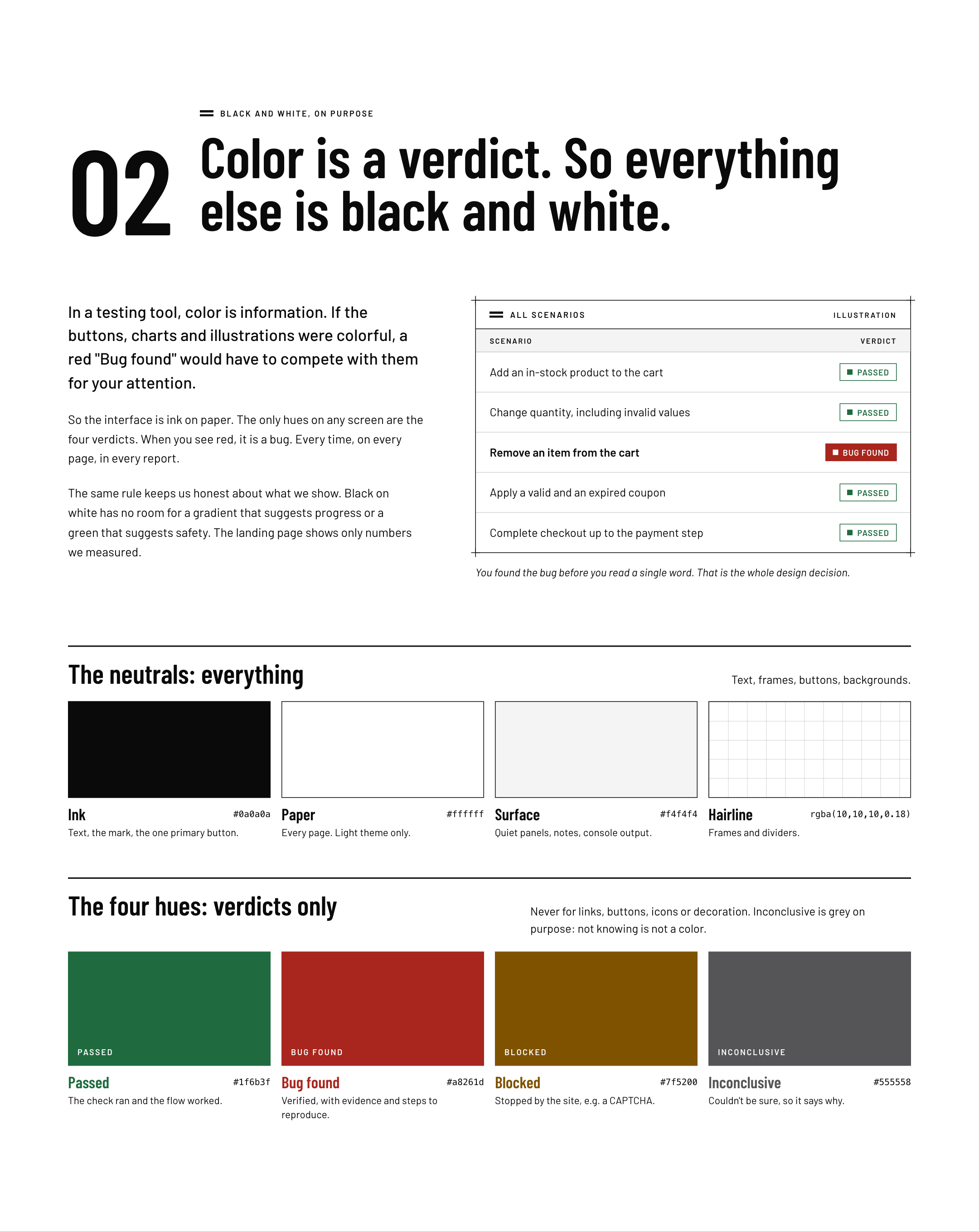
The central design decision is about colour. In a testing tool, colour is information. If buttons, charts and illustrations were colourful, a red "Bug found" would have to compete with them. So the interface is ink on paper, and the only hues anywhere are the four verdicts. Red is always a bug. Inconclusive is grey on purpose, because not knowing is not a colour. The charts on this page follow the same rule.
Headings are Barlow Condensed, narrow industrial letters that let timers, costs and verdicts sit in tight columns. Body text is regular Barlow, because repro steps are meant to be read carefully. Frames carry small "+" registration marks borrowed from engineering drawings, and each screen has exactly one black button: the next step you should take.
Always lowercase, even at the start of a sentence. The hyphen is part of the mark: it joins what the product does to how it does it.
I directed the visual system in Claude Design and implemented it twice in the product: first as an "Industry" system with a steel accent, then as the stricter black-and-white v3. After the freeze I also built a redesigned second frontend that runs beside the first one on the same API and accounts, using only real data. Any design placeholder without data behind it was left out.
Shipping it
- One VPS (2 vCPU, 3.8 GB) running Docker Compose: Caddy with automatic HTTPS, the API, the worker, PostgreSQL, Redis and the demo shop. Nightly database backups by cron.
- Real money, real limits. Every run costs real AI credit, so budgets live in the app: a per-run cost cap, daily run limits, separate API keys and budgets per audience (the judges' account and everyone else), and a run's cap lowered to whatever money the tier has left.
- Safe to open to the public. Per-IP rate limits on login and signup (no per-account lockout, so nobody can lock the judges out), an audit of every commit for secrets before the repo went public, and no server address in the repository.
- The submission pages (technical docs, business plan, brand page) are served by the same Caddy, marked
noindex.
Results at a glance
The judges' score
buildX scored every entry on four criteria, 25 points each. test-badger got 83 out of 100. For the live functional test, the judges ran it themselves on Easy mode, the cheaper one where Gemini 3.8 Flash drives the browser.
Using the "Test Badger" evaluation method, the planning and execution of seven scenarios on a sample store—up to the generation of the final report—took approximately 12 minutes. The report identified four issues, two successful outcomes, and one inconclusive result. This reflects the product's performance in a real-world scenario; however, results from a controlled demo cannot necessarily be generalized to all websites.Judge's feedback · run on Easy mode
The last point is fair, and it matches what the external benchmark showed: on a store I didn't build, honesty held but recall didn't.
What I'd build next
The external benchmark wrote the roadmap: give icon-only buttons a name in the snapshot, merge the same bug found by two scenarios, add more flow templates (login, contact form, booking, free-form goal), and schedule runs before every release.
Built with Claude Code as my pair programmer, from a written spec and a decision log I kept up to date the whole way. The story of how that worked is in the companion post: A week of building an agent that tests websites.